Some plc is no 485 communication port, such as Mitsubishi, Delta has one and a 232, and some have only one 485
Category: how to
Siemens PLC and inverter use RS485 to realize communication. There is a 485 male connector and a five-core cable. How to weld this connector?
Siemens and inverters have a variety of communication protocols, such as modbus, USS, DP, etc., but all communicate through the 485 port on Siemens PLC. Siemens’ 485 port definition is 3 feet for A+ and 8 feet for B-, so You can check the manual of the inverter and see which two feet of the communication interface are connected.
remember:
3 feet: RS485 send/receive + signal
8 feet: RS485 transmission / reception – signal
Other feet are generally not connected.
What is the RS485 communication protocol?
RS485 is a physical layer is not a communication protocol, there are many communication protocols with RS485 as the physical layer, such as: MODBUS, Siemens PROFIBUS DP, PA, MPI, PPI, and so on.
How to change s7200 communication protocol mpi to ppi
The communication of the S7200 is the PPI protocol.
MPI communication is only used when the S7200 exchanges data with the S7300 and S7400.
Siemens S7-300/400 PLC USB-MPI cable programming cable circuit diagram
W77E58P is a protocol conversion chip that needs to be programmed and burned to work.
CH341A needs to install USB to serial port driver
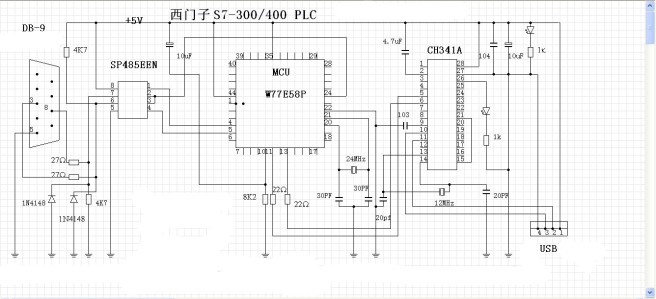

What is MPI cable?
MPI (Multi-Point Interface) is a technical term for SIEMENS. The interface on the S7-300/400 PLC is MPI. The MPI cable is a cable with one end connected to the MPI interface, and the other end can be in other forms, such as:
PC-MPI cable;
USB-MPI cable;
HMI-MPI cable; hmi-mpi cable from different manufacturers cannot be used universally, wiring pins are different
Siemens MPI cable production wiring

Where can I change the baud rate of the USB interface?
Siemens PC adapter USB connected to the S7-300 PLC, but the communication is not on, the driver is installed, I remember that after selecting the MPI interface in the Set PG/PC, it depends on the baud rate, it seems to be 1.5M, then in the device management Inside the Ports, find the U port of this line, modify the parameters of this U port, consistent with the properties inside the MPI line to successfully connect, now can not find this U port in Ports. Where can I modify it? ? ?
The PLC connection of Siemens S7-300 and S7-200 does not require setting the baud rate. It can be obtained directly by searching. When connecting, pay attention to the default baud rate and the dialing code on the programming cable.
How to use Siemens MPI / DP RS232 programming cable, how to set step7, how to upload the program
1, check if the programming cable hardware is connected to the computer,
2, check if the driver is installed correctly,
3. Open the S7 software, create an empty project, and then set the PGPC interface in “Settings”. If you are an MPI-USB connected PLC, please select MPI. If you are PROFIBUS, please select PROFIBUS, anyway, and the hardware you installed. The programming cable is identical.
Then return to the project interface, click “PLC” to upload the site, jump out of the dialog box and select “Show” and then select the site you want to upload.
Plc300 failed to connect to computer mpi
Prompt that version v8.2 is instilled onyour computer, this setup cannot instill version v2.0 on top of it. . . The computer is equipped with Siemens software. After plugging in the USB cable, the SIMATIC PC Adapter USB in the device manager still displays a yellow question mark, which cannot be safe. What is the reason?
The reason for the USB adapter driver, now the STEP7 5.5 version software has its own USB communication adapter driver, but it can only be used for the original USB communication adapter of Siemens. Those cottage USB communication adapters will appear in your situation. The solution is to change the STEP7 software with a slightly lower version, such as STEP7 5.4, or manually delete the USB driver file that comes with Siemens, and then manually install the driver that comes with your USB communication adapter.
Mitsubishi PLC and computer USB connection can not communicate 01802007
There are several reasons for this:
1, the corresponding USB driver is not installed.
2; The reason for the line.
3; communication port selection settings.
To use a line with two integrated blocks, there is a crystal inside, otherwise it can not communicate with the PLC.
What is the programming cable model of Mitsubishi FX series PLC?
The programming cable type of the FX series PLC is SC-09 cable or USB-SC09-FX cable.
SC-09 is used to connect to the computer serial port. USB-SC09-FX is used to connect to the computer USB port.
 PLC Cable